The inspiration came from a Kickstarter project called Fibonacci Clock. The description goes something like this...
The Fibonacci Clock has been designed for curious and inventive people who like a time piece that keeps them on their toes. Beautiful and fun at the same time, the clock uses the famous Fibonacci sequence to display time in a brand new way.
The Fibonacci sequence is a sequence of numbers created by the Italian mathematician Fibonacci in the 13th century. This is a sequence starting with 1 and 1, where each subsequent number is the sum of the previous two. For the clock I used the first 5 terms: 1, 1, 2, 3 and 5.
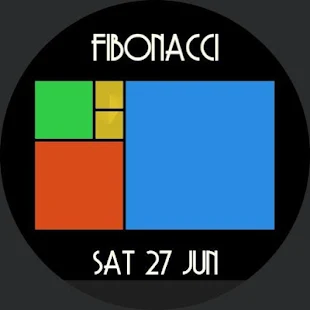
The screen of the clock is made up of five squares whose side lengths match the first five Fibonacci numbers: 1, 1, 2, 3 and 5. The hours are displayed using red and the minutes using green. When a square is used to display both the hours and minutes it turns blue. White squares are ignored.
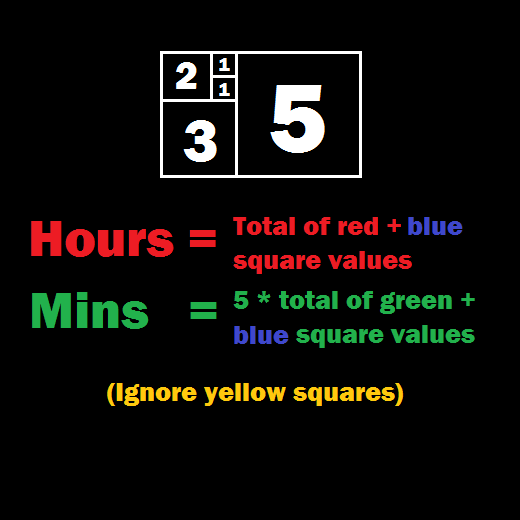
To tell time on the Fibonacci clock you need to do some math. To read the hour, simply add up the corresponding values of the red and blue squares. To read the minutes, do the same with the green and blue squares. The minutes are displayed in 5 minute increments (0 to 12) so you have to multiply your result by 5 to get the actual number.
The two smaller squares display additional information when the watch is in bright mode. The top one displays which minute within the 5 minute increment, and the bottom one displays the seconds.
For example, the time above is...
- 5 (blue) + 3 (red) = 8 o'clock.
- 5 (blue) + 2 (green) = 7. 7 * 5 = 35. Therefore: 8:35.
- The top small square is pointing down, which indicates 3 minutes. Therefore: 8:38.
Tapping on the watch face reveals a reminder of how to tell the time...
Often, there are multiple ways to display a single time. There are, for example, 16 different ways to display 6:30. In the first version of this watch face, the highest value squares are always picked first (6 = 5 + 1), but I hope to update the watch with a randomiser in future.
If you want to download this watch face, it's available on the Play store.


