Somewhere along the line, I missed the fact that WatchMaker went and got itself a new website! And along with this, they are now hosting watch faces themselves, which you can easily publish to from the app.
I have quite a lot of watch faces on FaceRepo, but I am currently in the process of uploading them all to the official repo.
These can now be downloaded from my WatchMaker profile page.
Showing posts with label facerepo. Show all posts
Showing posts with label facerepo. Show all posts
Thursday, 24 August 2017

Monday, 1 August 2016
New series - Ochs & Junior
I stumbled across the Ochs Und Junior website whilst looking for inspiration for a new watch face. I decided I liked these watches so much that I'd try to replicate my favourites using WatchMaker, my go-to watch face app.
The designer, Dr Ludwig Oechslin's main design principle was that an analogue date display is more readable than a digital display from the same distance, and unlike large digital displays, the date dot is not a distraction when checking the time.
Date (download from FaceRepo)
Dr Ludwig Oechslin's date watch displays the essentials - time and date. Lovely and minimalist.

Dr Ludwig Oechslin's annual calendar watch displays the date, month, weekday and time. The 7 holes on the lower dial display the weekday (counterclockwise rotation), with Sunday at the top. The 12 holes on the upper dial display the month (counterclockwise rotation).

Dr Ludwig Oechslin's moon phase watch displays the moon phase, date, and time. The center represents earth and 12 o'clock represents the sun. Full moon is when the moon is opposite the sun and earth at 6 o'clock. New moon is when the moon is hidden between the sun and earth at 12 o'clock.

This watch is based on the same style as Dr Ludwig Oechslin's watches, but is a variation of my own design. The 10 holes on the lower dial display the charge remaining in your watch (the top hole pulses whilst charging). The 10 holes on the upper dial display the charge remaining in your phone (the top hole pulses whilst charging).

Dr. Ludwig Oechslin's perpetual calendar watch is designed for everyday use. Analog dots represent the year, month and date to address a key usability challenge with calendar watches: making the date legible, without resorting to an oversized display which distracts from reading the time. The 4 perforations in the month disk indicate the month, and also show whether it is a leap year or a common year. When the outermost dot is orange, it is a leap year (366 days), but when it is dark, it is a common year (365 days). The small circle beneath 12 o'clock is the power reserve indicator - the disk rotates counterclockwise. Just above the 6 o'clock marker is a seconds disk with a milled excentric dot, which shows the watch is running. There is also a day/night marker, which uses the sunrise/sunset time to determine whether it is lit.

The designer, Dr Ludwig Oechslin's main design principle was that an analogue date display is more readable than a digital display from the same distance, and unlike large digital displays, the date dot is not a distraction when checking the time.
Date (download from FaceRepo)
Dr Ludwig Oechslin's date watch displays the essentials - time and date. Lovely and minimalist.

Calendar (download from FaceRepo)

Moon Phase (download from FaceRepo)

Charge (download from FaceRepo)

Perpetual (download from FaceRepo)

On each of these watch faces, tapping the center will change the watch face colour from grey to blue to green to yellow, although the original grey is definitely my personal preference.
Saturday, 30 July 2016
WatchMaker - unpacking the .watch file - updated!
WatchMaker has been enhanced since I wrote this post originally, so I thought I'd post an updated version.
When you export a watch from WatchMaker, the app creates a ".watch" file. This can then be imported by someone else, or uploaded to a face sharing website (such as FaceRepo) for others to enjoy.
If you're like me though, you might be interested in how this ".watch" file is made up though, what it contains. So let's take one of my first watch faces for example...

The file itself is a ZIP archive, so the first step is to extract the files. Personally I prefer 7-Zip, but you can use the tool of your choice for this.
After you've unpacked the files, you should see a structure something like this...

The files included in this example are...

When you export a watch from WatchMaker, the app creates a ".watch" file. This can then be imported by someone else, or uploaded to a face sharing website (such as FaceRepo) for others to enjoy.
If you're like me though, you might be interested in how this ".watch" file is made up though, what it contains. So let's take one of my first watch faces for example...
The file itself is a ZIP archive, so the first step is to extract the files. Personally I prefer 7-Zip, but you can use the tool of your choice for this.
After you've unpacked the files, you should see a structure something like this...

The files included in this example are...
- fonts
- Roboto-Regular.ttf
- images
- .img25.jpg
- .img60.png
- .img61.png
- .img62.png
- .img63.png
- preview.jpg
- preview_dim.jpg
- watch.xml
So any fonts and images that are used in the watch face are included in their respective folders. For example, the ".img60.png" and ".img61.png" are Sprites that hold multiple images in one, for the battery levels. There is also the background (".img25.jpg") and both watch hands (".img62.png" and ".img63.png").
There are also two preview images, for both the normal/bright preview ("preview.jpg") and the dimmed preview ("preview_dim.jpg").
The final file (watch.xml) is probably the most interesting, as this contains all of the settings and configuration of the watch face and the layers that make it up. You can open this file to view in a web browser, or you can edit it in any text editor (I prefer Notepad++)...

This ".xml" file has a root <Watch> tag, with attributes that contain the settings for the watch face, and then a number of <Layer> tags, with attributes that contain the configuration for each layer. Whilst you may or may not be familiar with XML, it should be easy enough to tell from the attributes and their values how these match up with the different properties in the WatchMaker app.
The main addition in recent months is the "features" attribute of the <Watch> tag - this is automatically updated as you edit the watch face and add/remove tags. It is then used by sites (such as FaceRepo) to list the features that your watch face has.
The main addition in recent months is the "features" attribute of the <Watch> tag - this is automatically updated as you edit the watch face and add/remove tags. It is then used by sites (such as FaceRepo) to list the features that your watch face has.
This includes the layers of type "image" which have a "path" and those of type "text" which have a "font", both of which link to the included files above. Also there's the "display" attribute, which is "b" for bright only, "d" for dimmed only and "bd" for always.
Next time I'm working on a complicated LUA script, I may well export it to Dropbox so I can write it on my laptop, then import it back into the WatchMaker app - much easier than typing curly braces on my phone keyboard!
There is also the option now to export a watch face in "protected" mode. This creates a slightly different set of files...


There is also the option now to export a watch face in "protected" mode. This creates a slightly different set of files...

Now there is an extra file called "watch.pxml", and the contents of the "watch.xml" file are quite different...

Now "watch.xml" only contains the <Watch> tag, with the "protection" attribute set.
All of the layers are in "watch.pxml"...

...but they're encrypted! This is great for when you've created a watch that you want to sell on the Play store, or upload without the risk of someone copying and modifying your watch face.
Hopefully you've found this update useful.
Friday, 29 July 2016
New watch face - Pokemon Go
Pokemon Go is probably the biggest craze right now, enticing adults and children alike into running around catching and hatching Pokemon.
The game divides people into 3 teams...


The game divides people into 3 teams...
- Team Instinct, Colour - Yellow, Leader - Spark, Mascot - Zapdos
- Team Mystic, Colour - Blue, Leader - Blanche, Mascot - Articuno
- Team Valor, Colour - Red, Leader - Candela, Mascot - Moltres
To celebrate the fun I'm having playing this game, I decided to create a watch using WatchMaker which, just like the game, allows you to choose a team (by tapping the center of the watch face)...


You can download the watch face from FaceRepo.
I hope you enjoy!
Friday, 17 June 2016
International Watch Co
I've recently received the following email from FaceRepo...
Sadly, we've had to remove a face you uploaded to FaceRepo.
Face name: International Watch Co
Face URL: https://facerepo.com/app/
This face was removed for the following reason:
Removal was requested by the copyright and/or trademark holder of elements used in the face.
We apologize for any inconvenience this may have caused. Please feel free to reply to this email with any specific questions you may have.
- FaceRepo.com
Exciting - not had one of those before!
The watch face in question looks like this...

It's certainly not one of my better watches, as none of the cogs move, which was my original intention. I planned to come back and do a better job of it, but apparently it's not allowed!
If you're interested in downloading this watch face, it may or may not appear on a popular file hosting site... Don't click here to download!
Sadly, we've had to remove a face you uploaded to FaceRepo.
Face name: International Watch Co
Face URL: https://facerepo.com/app/
This face was removed for the following reason:
Removal was requested by the copyright and/or trademark holder of elements used in the face.
We apologize for any inconvenience this may have caused. Please feel free to reply to this email with any specific questions you may have.
- FaceRepo.com
Exciting - not had one of those before!
The watch face in question looks like this...

It's certainly not one of my better watches, as none of the cogs move, which was my original intention. I planned to come back and do a better job of it, but apparently it's not allowed!
If you're interested in downloading this watch face, it may or may not appear on a popular file hosting site... Don't click here to download!
Saturday, 11 June 2016
New watch faces - Divergent and Total Annihilation
It's been ages since I spent time working on new watch faces, so I thought I'd get back into the swing by creating a couple of simple watches I'd been thinking about, and here they are.
Divergent - download from FaceRepo
Anyone loving the Divergent film series (based on the novel by Veronica Roth)? Well I am! Abnegation, Erudite, Dauntless, Amity or Candor - click the center to choose your faction.

Anyone remember the old Cavedog game Total Annihilation? Well I do! Core vs. Arm - click at the top to choose your side.

Divergent - download from FaceRepo
Anyone loving the Divergent film series (based on the novel by Veronica Roth)? Well I am! Abnegation, Erudite, Dauntless, Amity or Candor - click the center to choose your faction.

Total Annihilation - download from FaceRepo
Anyone remember the old Cavedog game Total Annihilation? Well I do! Core vs. Arm - click at the top to choose your side.

I hope you like the new watch faces - hopefully there will be more coming soon- watch this space!
Thursday, 24 December 2015
This week's watchface - Metallic-4
Whilst I'm not a big fan of the name, I'm really enjoying this watchface at the moment, and have been for a couple of weeks now. It's called the Metallic 4 (4 Colors- And 4 Dials) by bmg1001, and it looks like this...

As you can see from the preview, this is primarily an analogue watch, but with many additional features, including the digital time and the date displayed neatly at the top. I've never seen a design quite like this, but I really like the symmetry of it.
The watchface has a number of different tap actions as well. If you tap the digital date then it switches between 12 hour and 24 hour clocks - personally I prefer the 12 hour clock.
The top dial displays the weather, based on your WatchMaker settings (°C or °F, for example) and tapping the dial will refresh manually.
The right dial displays your watch's battery level as a percentage. If you tap this dial it will toggle to the phone's battery level (which shows a "P" in the dial) and then tap again to get back to the watch's battery level.
The bottom dial displays the current day of the week. If you tap this dial, it will toggle through the different colour options. There's black, silver, red and blue - personally I prefer the silver one at the moment, also I've also been using black.
The left dial displays your current step count, as a percentage of your daily target. If you tap this dial it will take you into the step count app, which for me is Google Fit, with a chart of recent days.
Overall I think this is a very stylish design, with plenty of functionality, but without overcrowding the screen with a complicated array of numbers. I can see myself settling on this one for a while.
As you can see from the preview, this is primarily an analogue watch, but with many additional features, including the digital time and the date displayed neatly at the top. I've never seen a design quite like this, but I really like the symmetry of it.
The watchface has a number of different tap actions as well. If you tap the digital date then it switches between 12 hour and 24 hour clocks - personally I prefer the 12 hour clock.
The top dial displays the weather, based on your WatchMaker settings (°C or °F, for example) and tapping the dial will refresh manually.
The right dial displays your watch's battery level as a percentage. If you tap this dial it will toggle to the phone's battery level (which shows a "P" in the dial) and then tap again to get back to the watch's battery level.
The bottom dial displays the current day of the week. If you tap this dial, it will toggle through the different colour options. There's black, silver, red and blue - personally I prefer the silver one at the moment, also I've also been using black.
The left dial displays your current step count, as a percentage of your daily target. If you tap this dial it will take you into the step count app, which for me is Google Fit, with a chart of recent days.
Overall I think this is a very stylish design, with plenty of functionality, but without overcrowding the screen with a complicated array of numbers. I can see myself settling on this one for a while.
Saturday, 10 October 2015
This week's watchface - Devon Tread
I've been a fan of the Devon Tread watches for a while now, but they don't even have a retailer in my country, let alone being able to afford one! Luckily I own a Moto 360, so I can have any watch I want though, thanks to WatchMaker.
If you don't know what I'm talking about, take a look at these...

As you can see, they are made up of belt which move to change the time display. I think this is ingenious, and the website describes them as "The reinvention of the watch. The Devon Tread 1 features a system of interwoven Time Belts™" - so good they trademarked and patented it - "the Tread 1 is the must-have timepiece for the watch enthusiast with a passion for innovation and ingenuity".
There are a number of different versions of the Tread 1 and the Tread 2, and for me it's hard to choose a favourite, I just love the idea of this kind of mechanical watch.
So it's been on my mind to create one (at least!) in WatchMaker for some time. But I've definitely been beaten to it! There are a number of them on FaceRepo already, which is a good thing.
My favourite at the moment is definitely the Devon Steampunk Tribute (Round) by eXntrc...

One of the things I really love about this version is that the numbers actually slide along the belt in a very realistic way, unlike some of the other watches where the number just change, but without any movement. I'd definitely recommend downloading it!
And maybe I'll get round to creating a variant of my own some day soon...
If you don't know what I'm talking about, take a look at these...

As you can see, they are made up of belt which move to change the time display. I think this is ingenious, and the website describes them as "The reinvention of the watch. The Devon Tread 1 features a system of interwoven Time Belts™" - so good they trademarked and patented it - "the Tread 1 is the must-have timepiece for the watch enthusiast with a passion for innovation and ingenuity".
There are a number of different versions of the Tread 1 and the Tread 2, and for me it's hard to choose a favourite, I just love the idea of this kind of mechanical watch.
So it's been on my mind to create one (at least!) in WatchMaker for some time. But I've definitely been beaten to it! There are a number of them on FaceRepo already, which is a good thing.
My favourite at the moment is definitely the Devon Steampunk Tribute (Round) by eXntrc...

One of the things I really love about this version is that the numbers actually slide along the belt in a very realistic way, unlike some of the other watches where the number just change, but without any movement. I'd definitely recommend downloading it!
And maybe I'll get round to creating a variant of my own some day soon...
Thursday, 4 June 2015
My top 7 downloaded watch faces
It's been a while since I've added a new watch face to FaceRepo, where I post all of my free watch faces, but I do have a new one in the works!
For now, I thought I would post my top 7 downloaded watch faces...
1) Pong - downloaded 445 times (permalink)
The background is a black and white animated pong match which goes on indefinitely under the clock details - maybe one day someone will score?

2) J.A.R.V.I.S. Mod - downloaded 423 times (permalink)
I downloaded a watch called "J.A.R.V.I.S." by uptwolait and described as "Simple watch face with animated gif of J.A.R.V.I.S. booting in the background.". I loved it, but wanted to add additional details, including the wifi, weather and battery level.

I downloaded a watch called "Tribute Rod Kucheran" by Enzo and described as "Tribute of Amazing watch face made with zooper widget by Rod Kucheran". I preferred the darker ambient mode, so here it is.

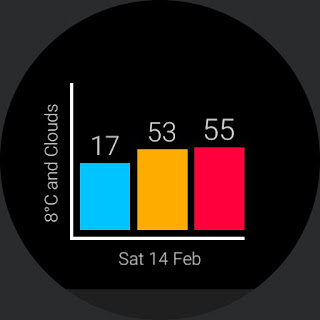
I downloaded a watch called "Bar" by cliffmaus and described as "See the time as a bar chart!". I loved it, but wanted to add additional details, including the date, weather and low battery indicators (they appear below 25%).
This watch is inspired by the Academia Mathematical watch by DeWitt. The Academia Mathematical features a fascinating "dial" where the current hour and minute come to life from an apparently chaotic group of numbers. Both hours and minutes are indicated using the "jumping numbers" display principle through two vertically aligned apertures positioned in the top half of the smoked sapphire crystal. Four wheels, each with its own gilt Arabic numerals, are used to display the four-digit decimal time.
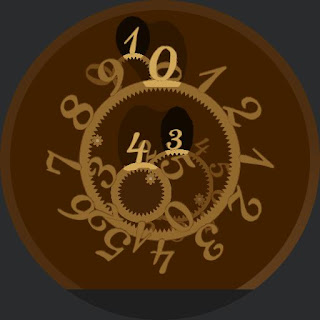
The Ora Unica, designed by Denis Guidone for the Milanese Nava Design of Italy, is an accessory that takes fun of the time, for design lovers that make the imagination and the irony their distinguishing feature. At first glance, you might be confused as to how to tell time on the Ora Unica, but it’s actually quite simple. Just look at the position of the inner end of the squiggle for the current hour, and the outer end for minutes. Simple, elegant, and truly unique.


For now, I thought I would post my top 7 downloaded watch faces...
1) Pong - downloaded 445 times (permalink)
The background is a black and white animated pong match which goes on indefinitely under the clock details - maybe one day someone will score?
2) J.A.R.V.I.S. Mod - downloaded 423 times (permalink)
I downloaded a watch called "J.A.R.V.I.S." by uptwolait and described as "Simple watch face with animated gif of J.A.R.V.I.S. booting in the background.". I loved it, but wanted to add additional details, including the wifi, weather and battery level.

3) Zooper Dark - downloaded 416 times (permalink)

4) Bar Mod - downloaded 369 times (permalink)

5) Academia Mathematical - downloaded 327 times (permalink)

6) Nava Ora Unica - downloaded 320 times (permalink)

7) Nava Ora Unica Black - downloaded 253 times (permalink)

I hope you enjoy these watch faces, especially as they are free! Most of them are not protected either, so you can tweak them as you like. If any of them are protected, let me know and I'll send you a non-protected version.
Saturday, 28 February 2015
WatchMaker - splitting seconds
WatchMaker (free and premium) gives you loads of tags, as I've previously discussed. However, when I came to make my latest project, I found a couple of omissions.
The project that I'm currently working on a watch face based on The Clock by Gislain Bernoit...

This is a 56x66cm masterpiece that weighs almost 6.5kg, it's made up of 1,916 individual hand-soldered components, which took the artist hundreds of hours over 3 years to create. It's truly one of a kind.
Having a circular screened Moto 360 watch, I decided to capture the middle part of the clock, in my homage to this amazing piece. And given the spacing on the digital displays I found this meant displaying each digit individually. So I needed 6 different text elements, and this is how they work...

The project that I'm currently working on a watch face based on The Clock by Gislain Bernoit...
This is a 56x66cm masterpiece that weighs almost 6.5kg, it's made up of 1,916 individual hand-soldered components, which took the artist hundreds of hours over 3 years to create. It's truly one of a kind.
Having a circular screened Moto 360 watch, I decided to capture the middle part of the clock, in my homage to this amazing piece. And given the spacing on the digital displays I found this meant displaying each digit individually. So I needed 6 different text elements, and this is how they work...
- Hours in day (0-23) tens - there's a tag for this: {dh23tt}
- Hours in day (0-23) ones - there's a tag for this too: {dh23to}
- Minutes in hour (tens) - {dmt}
- Minutes in hour (ones) - {dmo}
- Seconds in minute (tens) - string.sub("{dsz}",1,1)
- Seconds in minute (ones) - string.sub("{dsz}",2,2)
As you can see, there were tags specifically for the hours and minutes that were already split, but there wasn't for seconds. To get around this we can use "Seconds in minute (with leading zero)" {dsz} and then use the LUA string.sub command to split the two characters.
This is what I've come up with so far...
I'll be uploading it to FaceRepo once it's finished.
Monday, 23 February 2015
WatchMaker - unpacking the .watch file
When you export a watch from WatchMaker, the app creates a ".watch" file. This can then be imported by someone else, or uploaded to a face sharing website (such as FaceRepo) for others to enjoy.
If you're like me though, you might be interested in how this ".watch" file is made up though, what it contains. So let's take one of my first watch faces for example...
The file itself is a ZIP archive, so the first step is to extract the files. Personally I prefer 7-Zip, but you can use the tool of your choice for this.
After you've unpacked the files, you should see a structure something like this...

The files included in this example are...

If you're like me though, you might be interested in how this ".watch" file is made up though, what it contains. So let's take one of my first watch faces for example...
The file itself is a ZIP archive, so the first step is to extract the files. Personally I prefer 7-Zip, but you can use the tool of your choice for this.
After you've unpacked the files, you should see a structure something like this...
The files included in this example are...
- fonts
- Roboto-Regular.ttf
- images
- battery_set_1.png
- bg_premium5.jpg
- hand_hour_22.png
- hand_minute_22.png
- preview.jpg
- watch.xml
So any fonts and images that are used in the watch face are included in their respective folders. For example, the "battery_set_1.png" is a Sprite that holds multiple images in one. There is also the background ("bg_premium5.jpg") and both watch hands.
There is also a preview image ("preview.jpg") - this is the image that is displayed above, and it's also the one that FaceRepo uses. There is currently a feature request to add a dimmed preview image to the ".watch" file as well.
The final file (watch.xml) is probably the most interesting, as this contains all of the settings and configuration of the watch face and the layers that make it up. You can open this file to view in a web browser, or you can edit it in any text editor (I prefer Notepad++)...
This ".xml" file has a root <Watch> tag, with attributes that contain the settings for the watch face, and then a number of <Layer> tags, with attributes that contain the configuration for each layer. Whilst you may or may not be familiar with XML, it should be easy enough to tell from the attributes and their values how these match up with the different properties in the WatchMaker app.
This includes the layers of type "image" which have a "path" and those of type "text" which have a "font", both of which link to the included files above. Also there's the "display" attribute, which is "b" for bright only, "d" for dimmed only and "bd" for always.
Sunday, 22 February 2015
WatchMaker - adding internet time
I was reading through the Feature Requests for WatchMaker and stumbled across this one for adding Internet time (@.beats). Internet time was dreamt up by the Swatch corporation as part of their marketing campaign for their line of "Beat" watches in 1998. Instead of hours and minutes, the day is divided up into 1000 parts called ".beats". The idea was to have a time that was consistent around the word, so there are no timezones and no daylight savings. 0 beats starts at midnight in UTC+1.
I was interested in seeing what I could come up with, so I set about seeing what WatchMaker could do.
So I did some research, and according to Wikipedia, the calculation for converting from UTC+1 to beats is...
At first I thought that if I set the time settings in WatchMaker so that the Extra Time Zone 1 was UTC+1 (France)) then use the rotation values to calculate the beats. If you divide these by 360 (the total rotational value) then you can calculate the percentage and from this work out the hours and minutes. This worked ok, but the accuracy wasn't great. It also meant that the setting would need to be changed during daylight savings time, which would be annoying.


So I decided to come at it more directly, going back to the original calculation. So I converted the calculation into tags...
Whilst many places will show the decimal part of the beats value, the value is supposed to be integer. WatchMaker uses the LUA syntax, which includes some maths functions we can use...
I'm in the UK, so currently in the "GMT" timezone, which means I need to add an hour onto the hours (GMT is UTC). However, "BST" (British Summer Time which is UTC+1) is coming up in a few months, so I want to account for this as well. This can be done using LUA conditionality (as discussed in a previous blog post)...
This checks for the "GMT" timezone (using the {dz} tag) and adds 1 if it is, otherwise it doesn't. Obviously this will only work in the UK, but it would take a lot of conditional statements to account for the ~50 timezones (including daylight savings, etc). So this would have to do for now.
The trouble with adding the extra hour is that it goes up to 1041 instead of 999, but as it should loop back to 0 instead of going on to 1000, then easiest way to fix this is to take the last 3 characters of the string. Luckily LUA also gives us some string functions to use...
The "string.sub" method is used to create a substring, and the -3 means to take the last 3 characters.
Personally I prefer to always display 3 characters, so "000" instead of "0". The easiest way to do this, given the string manipulation that we're already doing, is to always add 1000 to the value. This means that the value will go from 1041 to 2041, but as we're always taking the last three characters, the first character is not needed...
I've not managed to fully test this, but I've been comparing it to other sources and it certainly seems to work correctly.
I wanted to update this watch face to FaceRepo, but unfortunately I got an error message saying that there were copyright issues, so I'm guessing "Swatch" is a dirty word! Here's what it looks like though...

I added the real time as well, because how many people really use internet time? It was an interesting challenge though. Hopefully the WatchMaker developer will be able to make more UTC time and timezone properties available, which will make this kind of calculation easier in future, across any timezone.
I was interested in seeing what I could come up with, so I set about seeing what WatchMaker could do.
So I did some research, and according to Wikipedia, the calculation for converting from UTC+1 to beats is...
(UTC+1seconds + (UTC+1minutes * 60) + (UTC+1hours * 3600)) / 86.4
At first I thought that if I set the time settings in WatchMaker so that the Extra Time Zone 1 was UTC+1 (France)) then use the rotation values to calculate the beats. If you divide these by 360 (the total rotational value) then you can calculate the percentage and from this work out the hours and minutes. This worked ok, but the accuracy wasn't great. It also meant that the setting would need to be changed during daylight savings time, which would be annoying.
So I decided to come at it more directly, going back to the original calculation. So I converted the calculation into tags...
({ds} + ({dm} * 60) + ({dh23} * 3600)) / 86.4
Whilst many places will show the decimal part of the beats value, the value is supposed to be integer. WatchMaker uses the LUA syntax, which includes some maths functions we can use...
math.floor(({ds} + ({dm} * 60) + ({dh23} * 3600)) / 86.4)
I'm in the UK, so currently in the "GMT" timezone, which means I need to add an hour onto the hours (GMT is UTC). However, "BST" (British Summer Time which is UTC+1) is coming up in a few months, so I want to account for this as well. This can be done using LUA conditionality (as discussed in a previous blog post)...
math.floor(({ds} + ({dm} * 60) + (({dh23} + ("{dz}"=="GMT" and 1 or 0)) * 3600)) / 86.4)
This checks for the "GMT" timezone (using the {dz} tag) and adds 1 if it is, otherwise it doesn't. Obviously this will only work in the UK, but it would take a lot of conditional statements to account for the ~50 timezones (including daylight savings, etc). So this would have to do for now.
The trouble with adding the extra hour is that it goes up to 1041 instead of 999, but as it should loop back to 0 instead of going on to 1000, then easiest way to fix this is to take the last 3 characters of the string. Luckily LUA also gives us some string functions to use...
string.sub(math.floor(({ds} + ({dm} * 60) + (({dh23} + ("{dz}"=="GMT" and 1 or 0)) * 3600)) / 86.4),-3)
The "string.sub" method is used to create a substring, and the -3 means to take the last 3 characters.
Personally I prefer to always display 3 characters, so "000" instead of "0". The easiest way to do this, given the string manipulation that we're already doing, is to always add 1000 to the value. This means that the value will go from 1041 to 2041, but as we're always taking the last three characters, the first character is not needed...
string.sub((math.floor(({ds} + ({dm} * 60) + (({dh23} + ("{dz}"=="GMT" and 1 or 0)) * 3600)) / 86.4) + 1000),-3)
I've not managed to fully test this, but I've been comparing it to other sources and it certainly seems to work correctly.
I wanted to update this watch face to FaceRepo, but unfortunately I got an error message saying that there were copyright issues, so I'm guessing "Swatch" is a dirty word! Here's what it looks like though...
I added the real time as well, because how many people really use internet time? It was an interesting challenge though. Hopefully the WatchMaker developer will be able to make more UTC time and timezone properties available, which will make this kind of calculation easier in future, across any timezone.
Sunday, 15 February 2015
Job one - the watch face
For me, the first job on getting the watch was to find a watch face that I liked. And I've found way too many that I like, and not enough time to try them all! But what I really like is designing and building my own.
There are two main apps for that; Facer and WatchMaker. I've played with both, and I have to say that the later is my favourite. There are many discussions online, with people arguing either way, but at the end of the day I think it comes down to personal preference. However, here's my list of reasons...


There are two main apps for that; Facer and WatchMaker. I've played with both, and I have to say that the later is my favourite. There are many discussions online, with people arguing either way, but at the end of the day I think it comes down to personal preference. However, here's my list of reasons...
- WatchMaker can import Facer files (.face) as well as it's own (.watch) and Facer can only handle it's own
- WatchMaker has many more customisation options than Facer
- WatchMaker has Tasker integration (that's a whole other post in itself!)
- WatchMaker has support for animated gif images
I'm sure there are more, but those are the main points for me at the moment.
There are lots of ways to get watch faces, included buying them from the Play store, but one of the best free repositories I've found is FaceRepo. The site can filter on round/square faces and Facer or WatchMaker files, making it easy to find ones suitable for your watch. It also allows you to create an account and upload your own watch faces.
I love downloading watch faces, importing them into my WatchMaker app, and then customising them to suit my own needs. Maybe I want the date formatted differently, or 24 hour time instead of 12 hour time, or whatever - easy!
You can either view the site and download the files directly, or you can browse on your computer and then use a QR reader on your phone to quickly and easily download. You can also get the .watch files from other sites and import them, as well as exporting your own creations as .watch files to upload and share.
Here are the top 3 watch faces that I've uploaded...
I've done 16 so far, including a range of Ron Swanson ones, and some Andy Fairhurst ones as well... http://facerepo.com/app/faces/user/trixmoto/1 - I hope you like. Feel free to provide feedback, either here or on the FaceRepo site (requires a Disqus account).
I've learned some interesting watching making tricks already, and I'm sure there's more to learn as well, so keep a look out for some future posts on this subject!
Subscribe to:
Posts (Atom)